What is Wholly
Wholly is an modern assistant for Whole Foods shoppers.
It helps you plan meals, make the most of your ingredients, and manage your shopping list effortlessly. In-store, Wholly suggests the fastest route to your items, compares products for the best value, and provides step-by-step cooking guidance so every meal is stress-free and delicious.
My Role
Lead Designer - Feature scoping, Research, Frame Design, System Design, Prototyping
Timeline
6 months, 2025.10-2026
Stakeholders Map
To break down these relationships and better understand their needs, I created a stakeholder map.


Amazon
electronic commerce operation
Farm
Recipe
Youtube Video
User-guided
Shop manager
Staff
Cashier
Dietary advice
Dietician
provide
provide
Gain
Receive
Scan
Feedback
Gather Data
Marketing
Search
Record
Push
Promote
technological
updates
Price
compare
Order
Cooperation
Authentication
Source

Share
Attract
Attract
Authentication
Compliance
Authentication
Provide
produce
collect
feedback
Environmental protection organization
Personalized recommendation
Market comparison data
Alternative identification tools
Sustainable certification
Consumer protection
governmental agencies
competitive brand
Food blogger
Online order
Pictures
Camera
Data analysis
Scanning results
Market maintenance


International Students


Search
Guide
Ask
Attract
Search
Teach


Order
Brief Introduction Relationship
Direct Relationship
The stakeholder map helped position international students within a broader grocery ecosystem, highlighting how their needs differ from local users across planning, shopping, and cooking stages.
After conducting initial contextual research into the cooking experiences of international students—including their planning, shopping, and cooking behaviors.
Core UX gap:
Although Whole Foods offers high-quality products, the experience is still fragmented:
In-store: overwhelming product variety and decision complexity
Not beginner- or international-user friendly: It assumes users are already familiar with local ingredients, brands, and cooking practices
Online: strong product catalog, but weak connection between ingredients and cooking
Core user behavior remains “buy ingredients,” not “complete a meal”
Limited real-time guidance: There is little support for in-the-moment decisions such as ingredient substitutions or cooking assistance
Lack of end-to-end support: The experience does not seamlessly connect meal planning → grocery shopping → cooking into a unified journey
Key Insight
This gap led me to further explore the different types of users involved in the grocery shopping and cooking experience.
Whole Foods Market is not designed as an international supermarket;
It is a U.S.-centric premium grocery system that offers limited global products but does not fully support international users in understanding, selecting, and using ingredients.

20–25%
International users and students
Problem
This question comes from the increasing complexity of everyday cooking.
Cooking is no longer just about preparing food — it involves planning meals, navigating grocery stores, understanding unfamiliar ingredients, and making decisions under constraints like budget, time, and language.
Context
Cooking at home has become an increasingly common part of everyday life.Recent studies show that many people now cook at home multiple times per week due to factors such as cost savings, healthier lifestyles, and changing daily routines.
As home cooking increased, grocery shopping became a larger part of everyday decision-making.To better understand these challenges, I focused my research on Whole foods market.


Sometimes
43%

Never
8%

Always
49%
Cooking Frequency Table
User Journey Map
After identifying international students as the primary user group, I conducted in-depth research into their cooking journey—from the moment they decide to prepare a meal, to navigating the supermarket, and finally cooking the dish.
By mapping this end-to-end experience, I identified key touch points and pain points at each stage, including planning, shopping, and cooking. This helped reveal systemic challenges such as unfamiliar ingredients, language barriers, decision fatigue, and lack of cooking confidence.

International Student
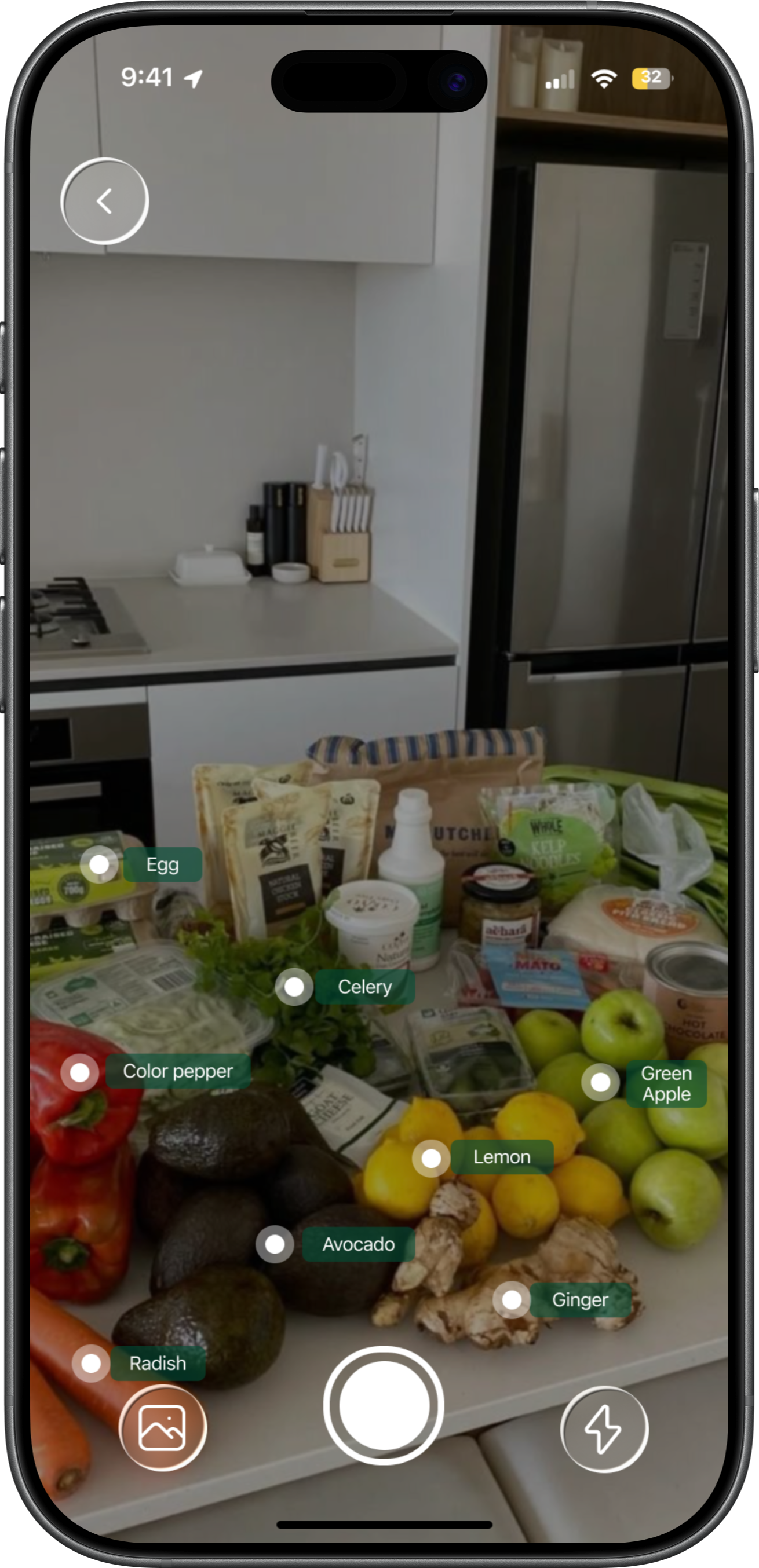
Users can take a photo of their ingredients with the camera, allowing Wholly to automatically recognize and identify each item. The system then generates an ingredient checklist, helping users quickly understand what they already have and what additional ingredients still need to be purchased.
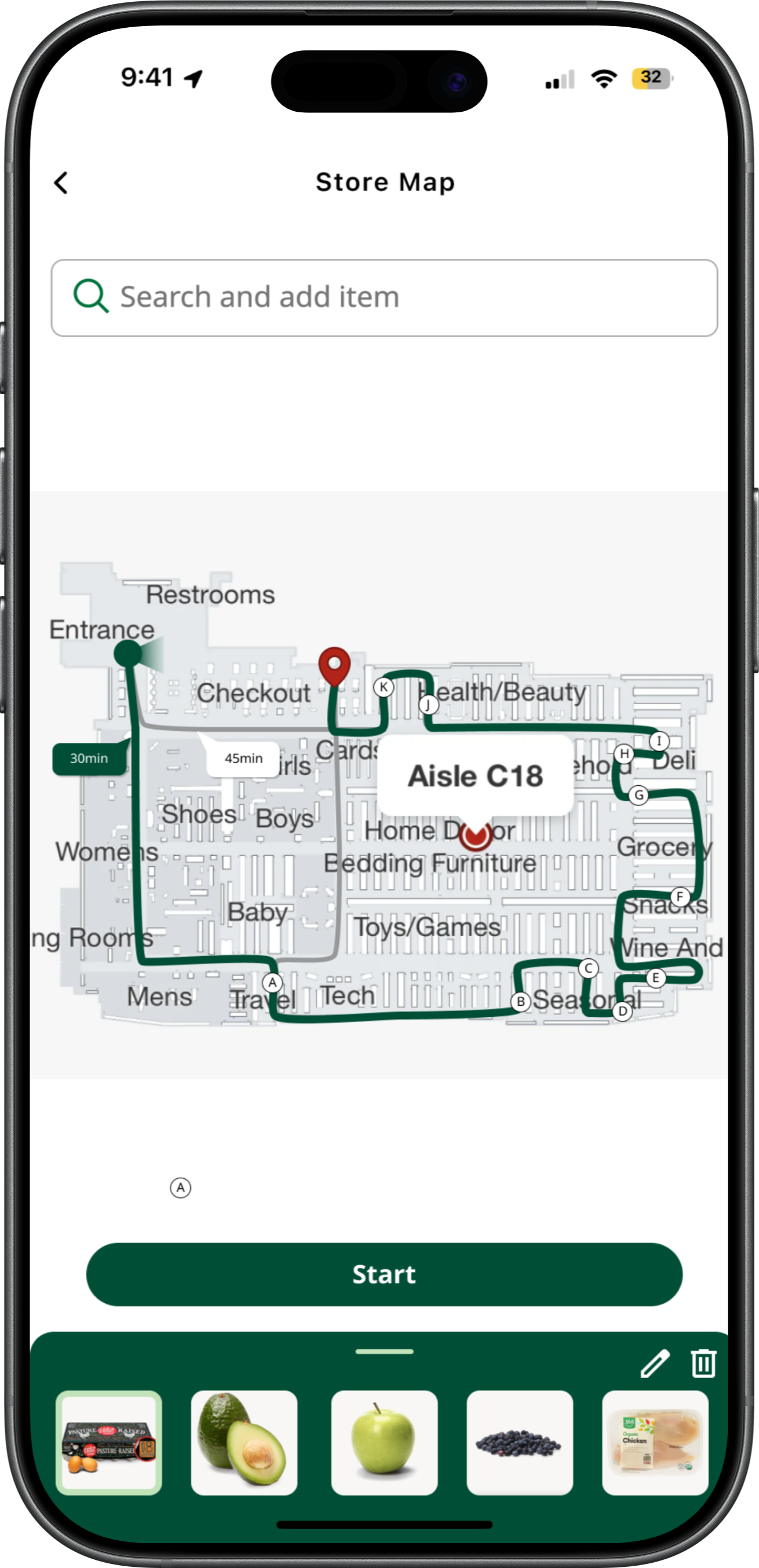
After confirming the ingredient checklist, Wholly provides the locations of each ingredient in the store and suggests the most efficient shopping routes, while still allowing users to choose their preferred path. As users find and add ingredients, the shopping cart total updates in real time, helping them track spending and better manage their budget.
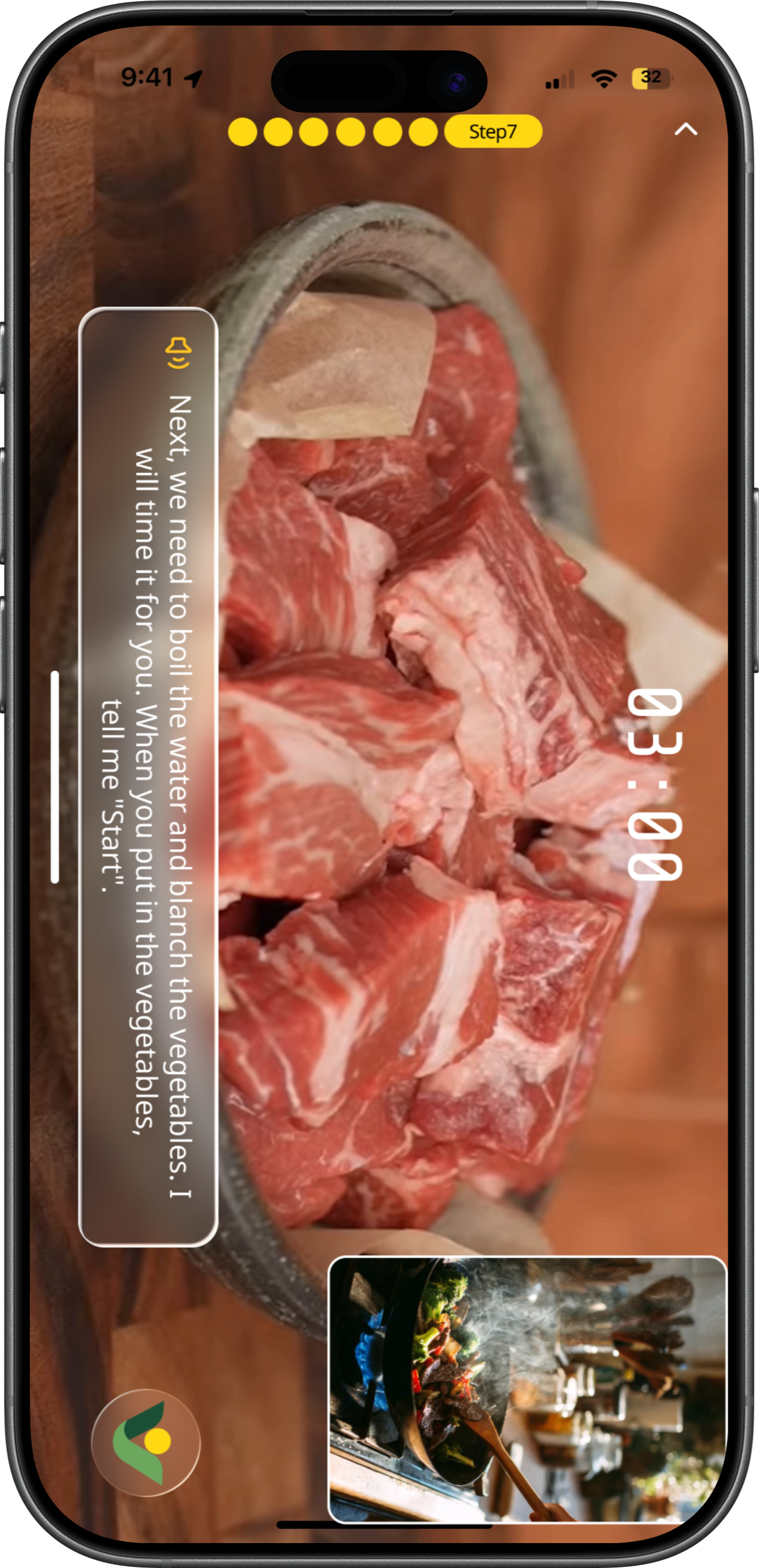
After users bring the ingredients home, Wholly provides recipe guidance while allowing users to freely substitute ingredients based on their preferences or available items. By turning on the camera, users can start a real-time cooking experience where Wholly observes the process and provides step-by-step guidance and support throughout cooking.
Final Design
Design system
Aa
SansSerif
Regular/Bold
Bb
Playfair Display
Bold Italic
Typography
Color
#004E36
#C2E3BA
#FFD814
#FAF5EC
CUI Design
Wholly is an AI assistant character inspired by the Whole Foods leaf. Its design uses clean lines and simple dots to create a smart, minimal look, blending a sense of nature with a modern, intelligent feel.
Definition

Smart
Reflects intelligence and the AI-driven nature, suggesting efficient and adaptive support.

Minimal
Uses simple lines and forms to create a clean, uncluttered visual style.

Natural
Inspired by the leaf element, connecting the design to organic growth and a sense of calm.

Real-time
Monitors and detects issues during cooking, offering immediate guidance and support.
Modality
Wholly Modality uses a leaf-inspired form combined with minimal lines to create a flexible and dynamic system.
The simple structure allows it to move and adapt smoothly, giving the AI assistant a sense of lightness, responsiveness, and life.

Motions
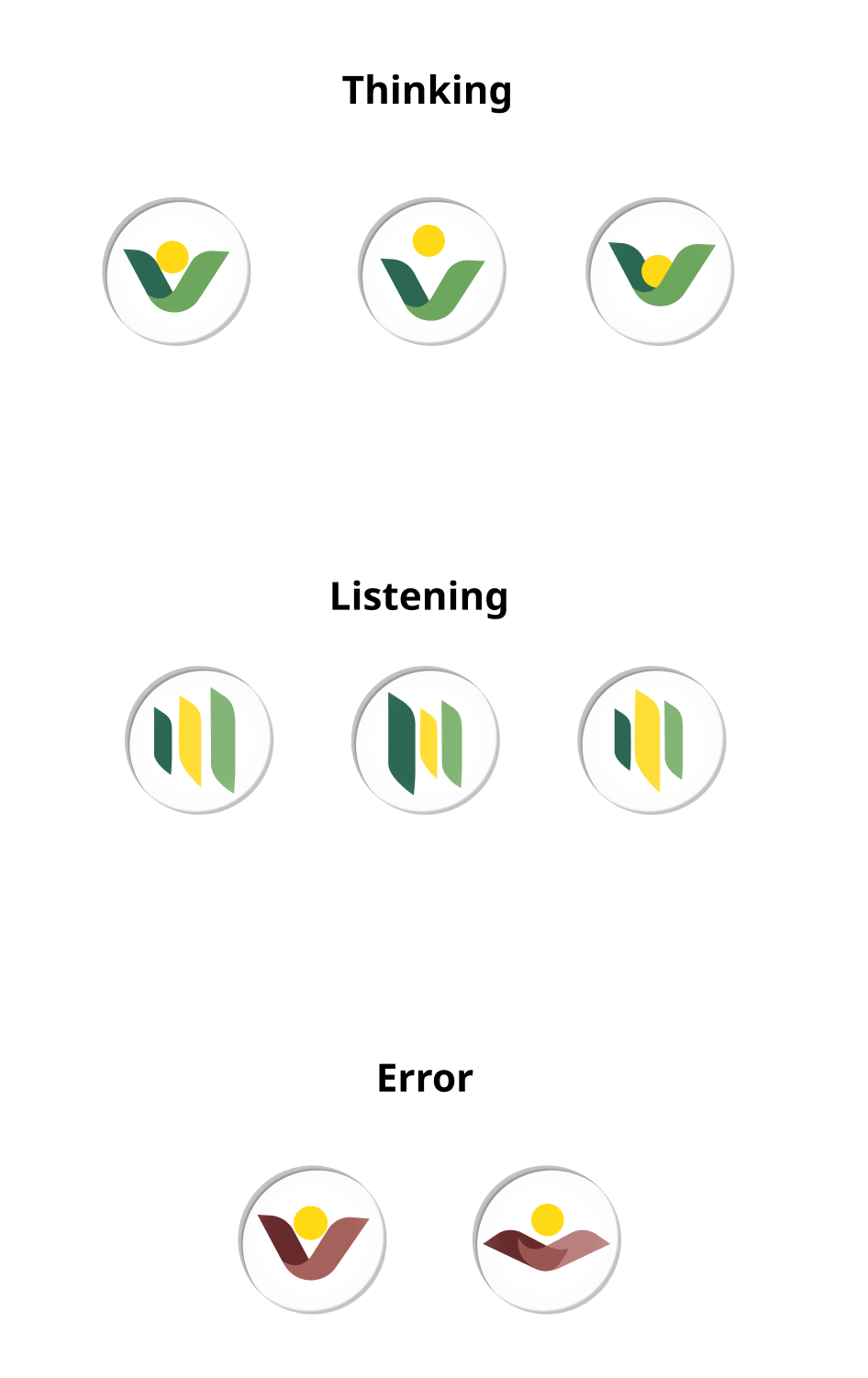
Wholly Motions adapt across different states, with both form and animation changing to reflect context. Each motion is designed to be clear and expressive, allowing the AI assistant to communicate status and feedback through subtle, fluid transformations.
Thinking
Listening
Error


Pain Point and Ideation
Insights from the user journey maps were synthesized into key pain points and translated into design opportunities, which guided the ideation process.
Problem
Ideation
Language barriers make labels, signs, and recipes hard to understand.
Help users follow cooking steps, reducing confusion from anxiety or inexperience.
Users struggle to find familiar seasonings and trust local alternatives.
Poor wayfinding makes it hard to find products efficiently.
Users struggle to choose recipes that match their skills, preferences, and constraints.
Selection
Budget
Visual step-by-step recipes
Personalized recipe suggestions
Budget-friendly options
Budget constraints limit ingredient choices.

Turn recipes into clear, visual step-by-step guides with tools and time.

Add multilingual support and visual cues to improve accessibility.

Recommend recipes based on user skill and available ingredients.

Suggest ingredient substitutes with flavor and pairing guidance.

Enable cost filters, price comparison, and smarter choices.

Provide in-app store navigation with aisle maps and product location tracking.
Step-by-step guidance keeps users focused with real-time reminders and assistance.

Hands-free navigation for recipes.


Recipes feel overwhelming—too complex, unclear on tools and ingredients, and too time-consuming.
Complexity
Language
Substitution
Wayfinding
Multilingual visual support
Confident substitutions
In-app map
Guidance
Enable hands-free access to recipes while cooking.

Hands busy
Real-time guidance
Hands-free navigation


Lower the Barrier for
International students
Smart Ingredient Management
Smarter
Shopping Support
Cross-Language & Easy Access
1
2
3
4
Provide personalized, accessible, and hands-free cooking support, including skill and ingredient-based recipe recommendations, cost-aware guidance, visual step-by-step instructions, ingredient substitutions with flavor tips, multilingual support, and in-app store navigation to reduce confusion and improve efficiency.
Wholly is placed within the ordering flow rather than the homepage to ensure it appears at the most relevant moment—when users are actively making meal and grocery decisions—making the assistance more contextual and actionable.
Design
Wholly is designed as a contextual assistant rather than a homepage feature, embedded into the ordering flow where decision-making happens.
Homepage Placement
Ordering Flow Placement

9:41


32


Search recipes in Whole Foods Market


Fastest
Easiest
Most Popular
Budget-friendly
Popular collections
Whatever Makes You Whole.





ORDER
9:41
32
New
Market Recipes
Cook Now
Every meal becomes a simple, creative expression.

Interactive Design
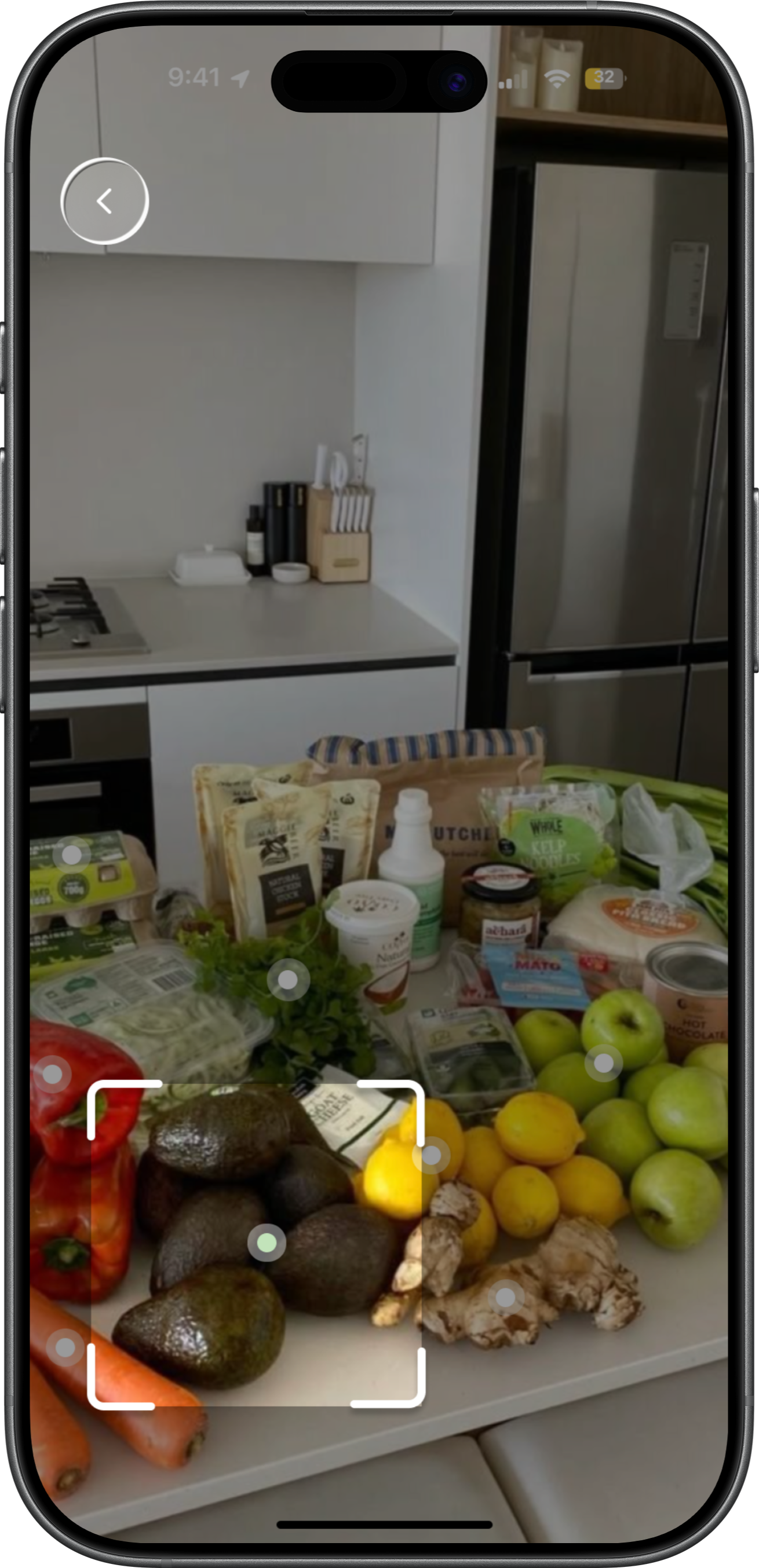
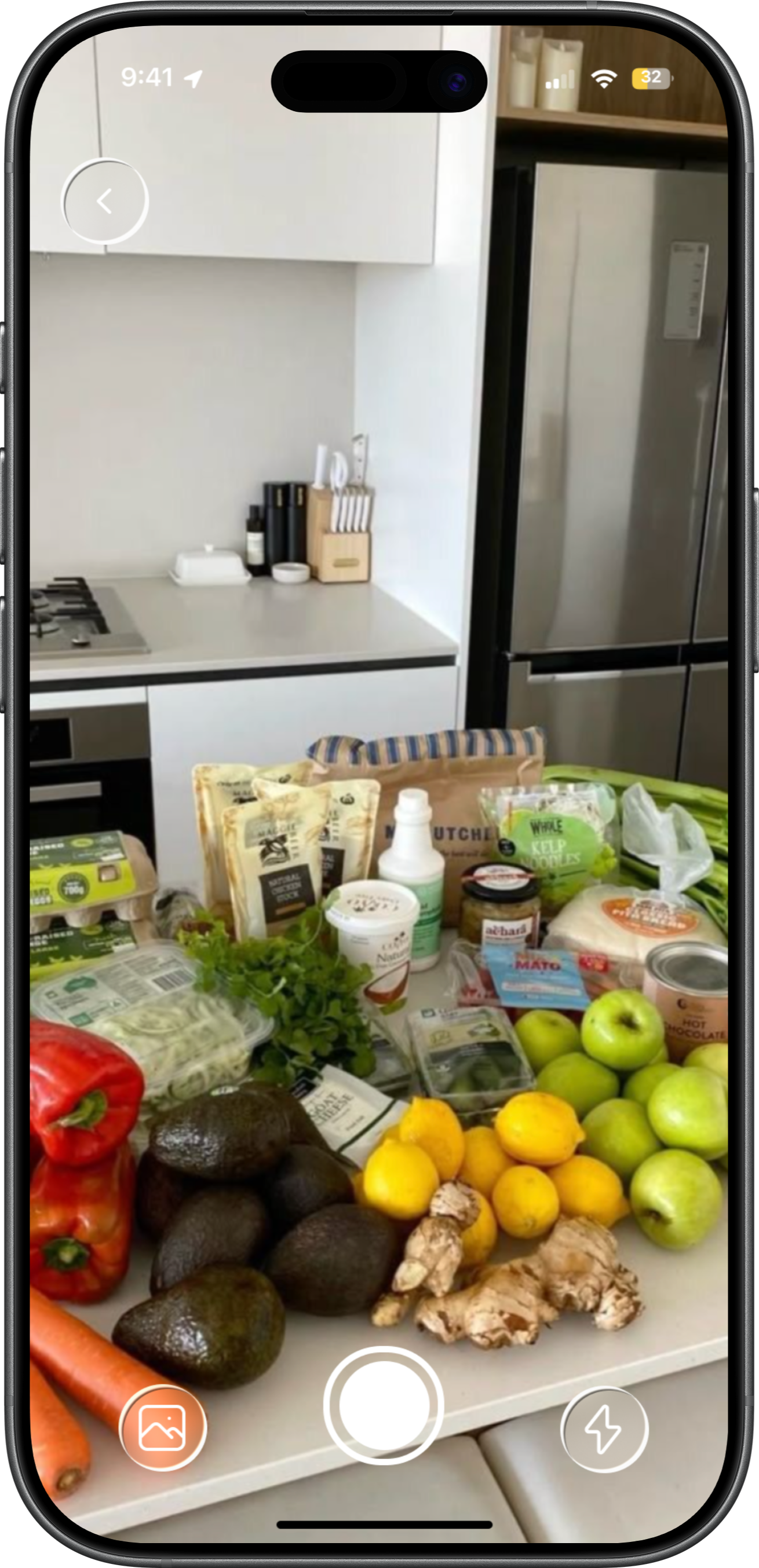
This interactive design allows users to use their camera to recognize ingredients in real time. As the camera scans, the detected ingredients are automatically generated into an ingredient list, helping users quickly organize what they have available. During the recognition process, animated flashing dots create visual feedback to show that the system is actively scanning and analyzing the ingredients, making the interaction feel more responsive, intuitive, and alive.
The stakeholder map helped position international students within a broader grocery ecosystem, highlighting how their needs differ from local users across planning, shopping, and cooking stages.
🤔
😬
📋
😬
🫤
🤔
😱
😕
🤔
🤔
😵💫
😵💫
In-store signs
Staff
Physical shelf
Package label
Product packaging
Price check
on phone
Self-checkout
Cashier
Rewards & coupons
Get lost
Time-consuming
Visual overload
Too many brands
Hard to choose
Long lines
High prices
Shelf locator
in app
“Beginner pick” tag
Shelf tag
Recipe-based
recommendations
Mobile payment
Automatic deals
Kitchen counter
Food packaging
YouTube
Measuring spoons
Stove
Smoke alarm
The ingredient itself
Recipe hints
Photo & share
Slow prep
Not familiar
with tools
Don’t understand
measure (tsp, tbsp)
Hard to
control heat
Can’t tell doneness
Poor presentation
Video tutorial
Visual ratio chart
Sauce packet
Real-time
reminders
Doneness
reference chart
Prompt users to share
😖
🤔
YouTube
TikTok
Whole Foods APP
Search engine
Recipe site
Recipe app
kitchen
Fridge
Memo
YouTube comments
Recipe app
Memo
Don’t know
where to start
Recipe is too complex
Miss ingredients
Easy to
miscalculate
Substitution fails
High risk
List doesn’t
match shelves
Beginner-friendly
recipes
3–5 ingredient
beginner recipes
One-click
shopping list
Compare
“have vs missing”
Suggest
substitute
ingredients
Smart shelf order
Want to cook a meal
What to cook
Confirm ingredients
what you’re
missing
Substitute
Create list
Suddenly want to cook
Search easy recipes
Check recipe ingredients
Compare kitchen vs recipe
Remove or replace
hard-to-find
ingredients
List missing
ingredients
I think I can do it
Which dish is easiest
What am I
missing
Only eggs and salt left at home
No need to
buy this maybe
Go to the store
navigate
Select
Compare ingredients
or brands
Purchase
Find listed
items in store
Scan the shelf
Compare
brands & prices
Checkout
Where is this
So many options
Which suits
me better
Hope this
is enough
Prepare
the ingredients
Seasonings
start cooking
Check if
it’s cooked
Done
Take out ingredients
Prep ingredients
Find and measure
seasonings
Heat pan
add oil, cook
Check the color
Taste it
Plate the dish
How to cut
How much is
one teaspoon
Is the pan too hot
Is it cooked
Finally done
😌
STAGE
ACTION
THINKING
EXPERIENCE
TOUCH
POINT
PAIN
POINT
OPPTUNITIES
Plan
Purchase
Cook

Beginner
STAGE
ACTION
THINKING
EXPERIENCE
TOUCH
POINT
PAIN
POINT
OPPTUNITIES
😵💫
🤷
😩
🧐
😨
😔
📋
📋
😰
🤔
😨
😰
In-store signs
Staff
Physical shelf
Package label
Price tag
Compare on
phone
Self-checkout
Cashier
Points
Supermarket
layout is complex
Visual overload
Unfamiliar brands
and high price
Can’t get
everything
in one trip
App shelf
navigation
International
ingredient tag
Recommend
items for
hometown dishes
Multi-channel
shopping
Kitchen counter
Cabinet
Stove
Ingredient
Table
Missing
traditional tools
Substitute
seasoning
Big flavor difference
Different
heat control
Hard to recreate
hometown flavors
Poor presentation
Video tutorial:
swap to
US kitchen tools
Flavor
similarity score
ooking assistant
gives alerts
Authentic swap
flavor balance tips
Simple plating
tips video
😟
😰
Family discussion
Cookbook
Recipe page
Kitchen
YouTube
comments
Family advice
Notes
APP list
Some ingredients
are uncommon
in the US
Recipe is
complex
Long
ingredient list
Need to shop
at multiple stores
Big flavor
difference
after substitution
Can’t get
everything
in one trip
Recommend
International
ingredients
section
Offer simplified hometown recipe
One-click list
with local
availability
Compare
what you have
what’s missing
Science-based
ingredient swaps
Cross-store
shopping list
Plan
Purchase
Cook
Want to
cook a meal
What to cook
Check the ingredients
what you’re
missing
Create list
Decide to cook
hometown dishes
this weekend.
Choose one
hometown dish
Check the
full list
Check the fridge
and cabinets
Remove
the hard-to-find
spices.
Write down
the missing
ingredients
Haven’t eaten
this dish
for a long time.
What ingredients
are needed
Many of
the seasonings
can’t be found
in the U.S.
Missing
seasonings
substitute
this spice
with something else
Go to
Whole Foods first,
then other
supermarket
Substitute
navigate
Select
Compare ingredients
or brands
Purchase
Enter
the supermarket
and look for
ingredients
Find the shelves
and start picking
Compare different
brands and prices.
Check out
and pay
Where is it
There are
so many types
Which one
should I take?
This organic
one is twice
as expensive as
the regular one.
I still have to
go to another
store to buy it.
Prepare
the ingredients
Seasonings
start cooking
Check if
it’s cooked
Done
Take out
the ingredients
and get ready
to cook
Take out
the spices
and sauces
Cook in the pan
Taste and observe
Serve to family
Will the texture
be worse
if I cut it
the wrong way?
This seasoning
tastes a bit
different.
Induction cooking
lacks the
wok flavor.
It still tastes
a bit off
Hope they like it
😌

immigrant
I mapped journeys for three user groups—international students, immigrants, and beginner cooks—to compare their experiences.
This helped identify both shared and unique pain points, and guided the decision to focus on international students as the primary target user.
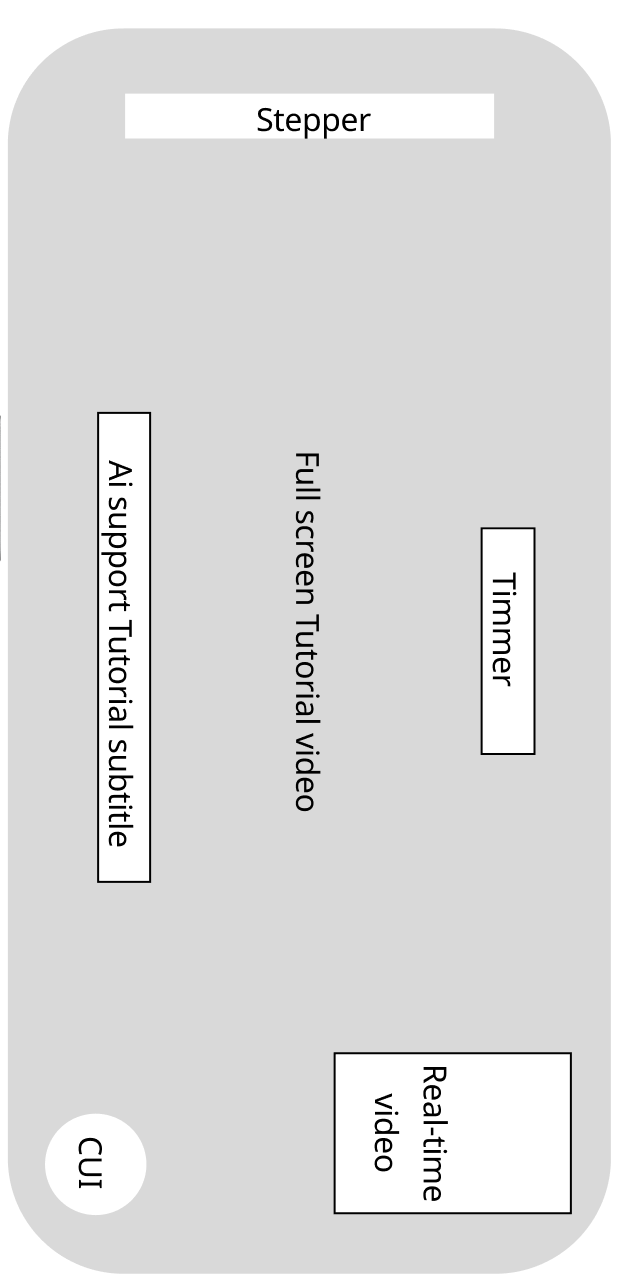
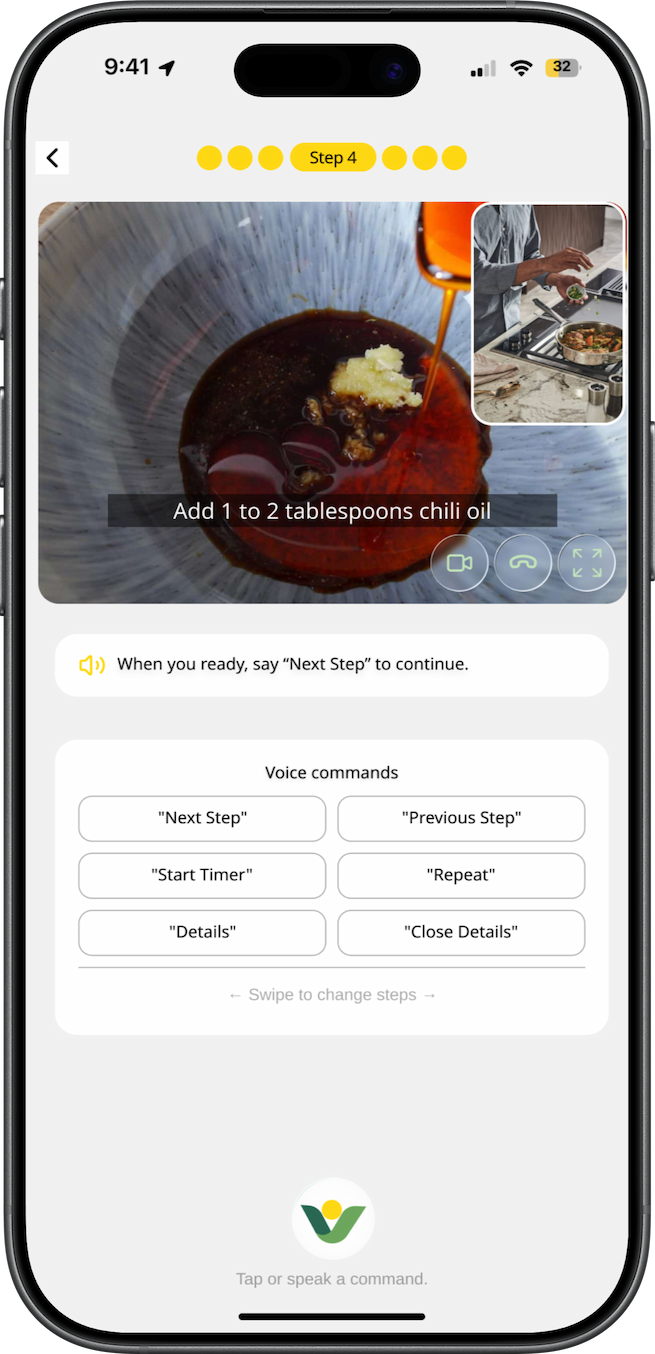
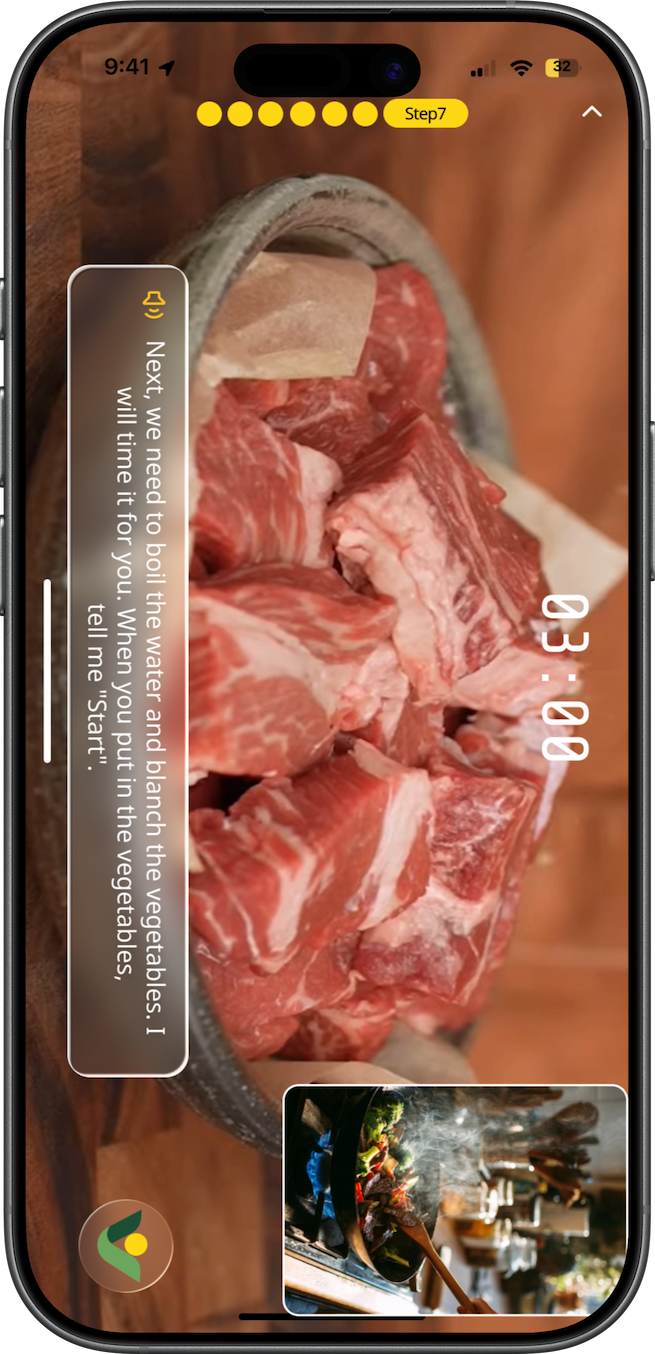
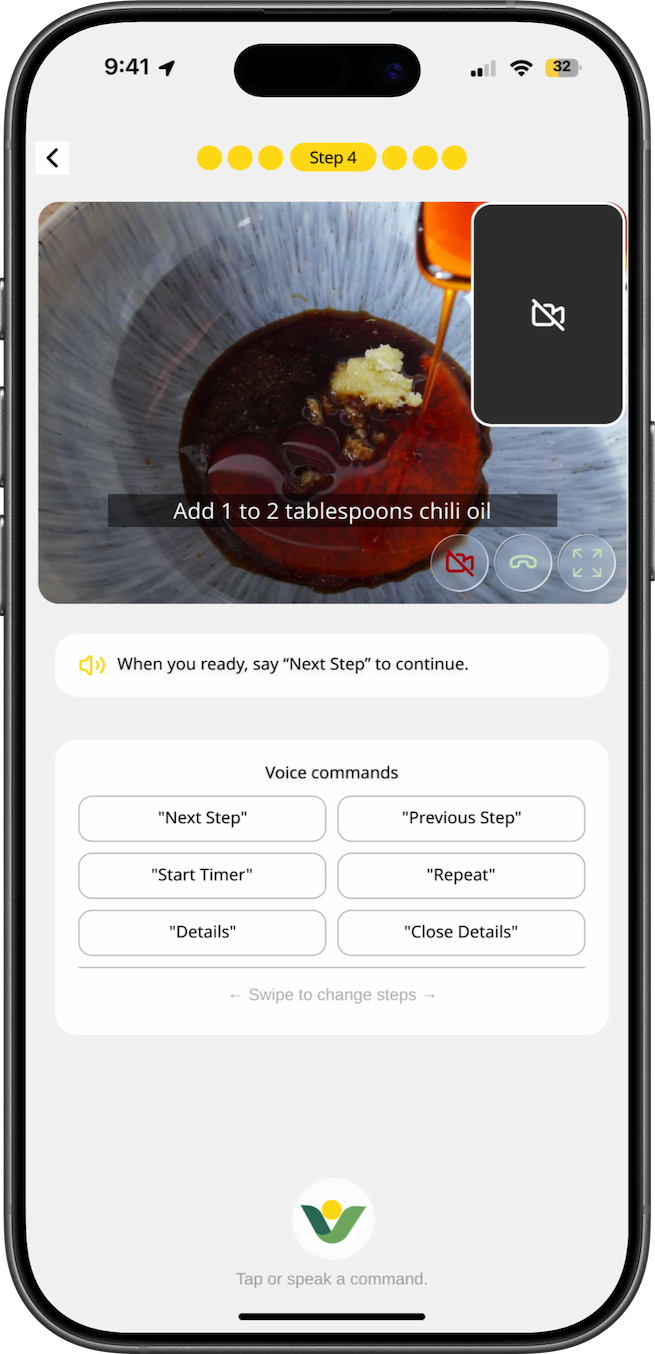
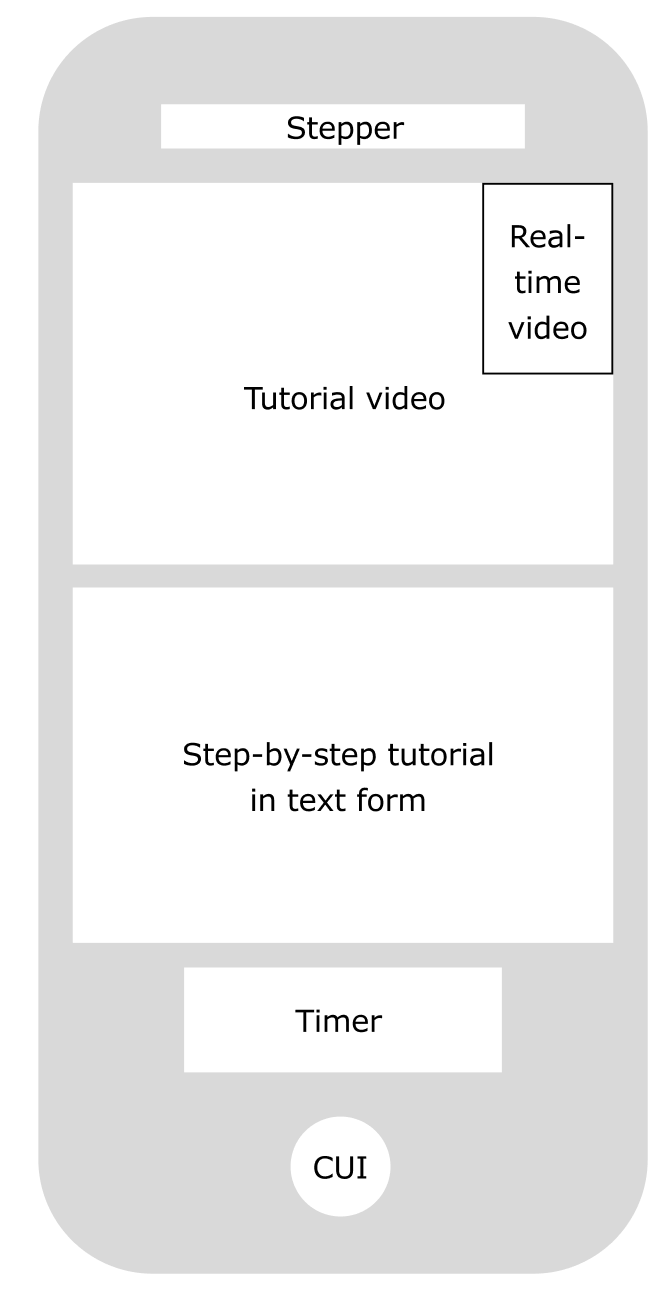
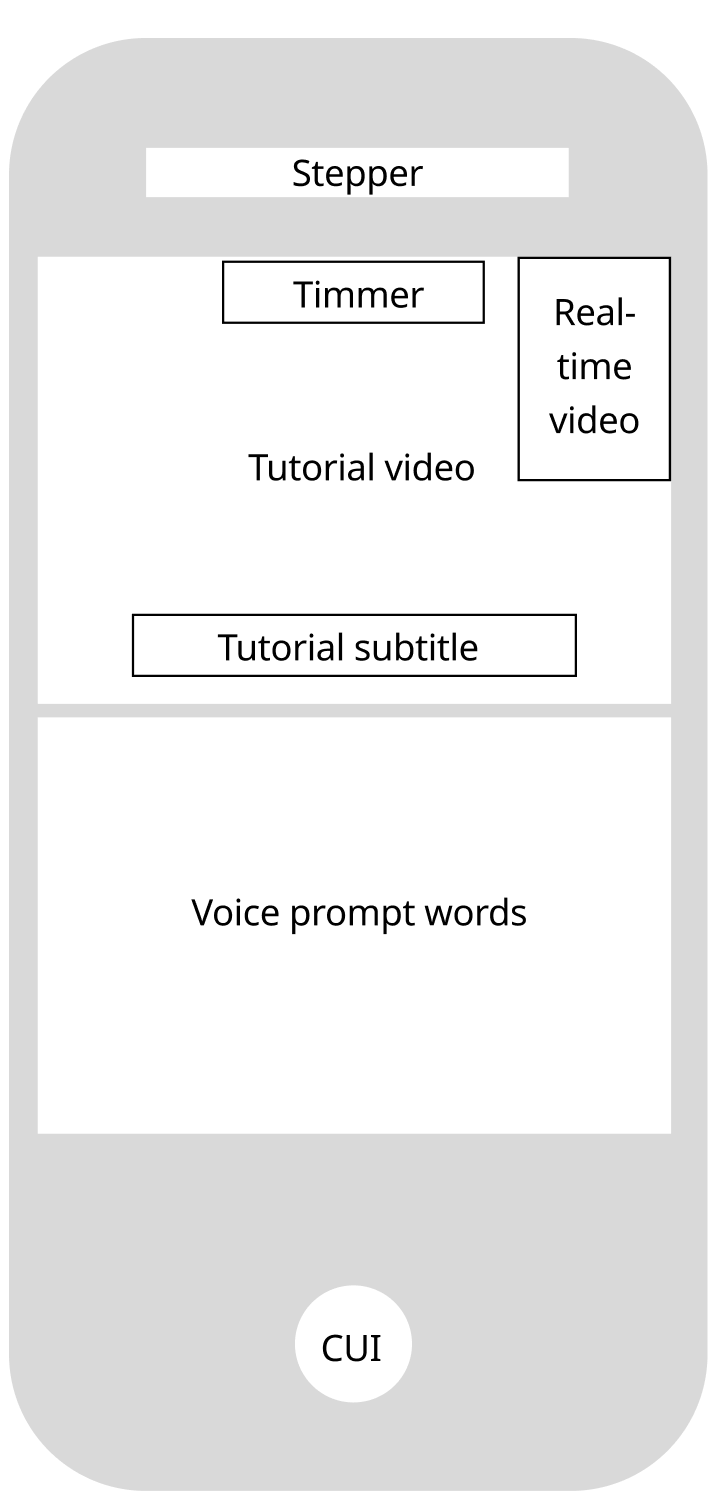
The two frames prioritize different user needs during cooking. Frame 1 focuses on efficient recipe execution by presenting more cooking information at once, while Frame 2 emphasizes onboarding and hands-free interaction guidance through stronger voice-command visibility. This comparison helped reveal the trade-off between instructional guidance and cooking efficiency in the design process.
Layout

Integrated cooking flow:
Combines ingredients, steps, timers, and actions in one interface for a complete cooking experience

Strong timer visibility:
The cooking timer is clear and easy to track during active use

High cognitive load:
Too much text increases reading and decision effort during cooking

Limited onboarding/guidance:
Users lack immediate instructions on how to interact with the system

Feels like a traditional recipe app:
Despite AI potential, the experience does not fully support a hands-free assistant behavior
Stepper
Tutorial video
Step-by-step tutorial in text form
Timer

CUI
Real-time
video

Strong voice interaction clarity:
Clear prompts and command buttons make hands-free control easy to understand and learn

High immersion:
Full-screen visuals and conversational AI create a focused, engaging cooking experience

Natural hands-free interaction:
Voice prompts support intuitive, voice-led cooking flow

Aligned with AI assistant identity: Reinforces Wholly as a conversational, voice-driven cooking assistant

Good onboarding for beginners: Provides strong step-by-step guidance and reduces learning barriers

Reduced content space:
Large command area takes up space from recipe content

Visual imbalance:
Too many buttons and small images create a fragmented and scattered focus
Stepper
Tutorial video
Voice prompt words

CUI
Real-time
video
Timmer
Tutorial subtitle
Stepper
Stepper
Full screen Tutorial video
Ai support Tutorial subtitle
Real-time
video

CUI
Timmer
Missed
Ingredients
Hard to
Track Quantities
Auto-Generate
Missing Items List
Language
Barrier
App
Navigation
Lack of
Experience
Hands are
not free
Hands are
not free
Hands are
not free
Hands are
not free
Hands are
not free
Video
Tutorials
Cutting
Guide
Suggest
Local
Substitutes
Timing Tips
Multiple
Payment
Options
Simple
Plating Tips
Flavor
Differences
Heat
Control
Difficult
Tips for
Judging
Doneness
Bad Taste
Bilingual
Support
Hard to
Communicate
High Risk
Provide
Substitution
Options
Can’t
Understand
Differences
Budget constraints
Multiple Payment
Options
Payment
Guidance
Icon-based
Simple
Explanation
High Risk
Provide
Substitution
Options
Can’t
Locate
Items
Don’t Know
Shelf Layout
Auto-Sort by
Shelf Location
Mismatch and Confirm

Missing or Uncertain
Ingredient Amounts


Can’t Find
Ingredients
Need
Substitutes

Create list
Buy at
market


Don’t Know
Shelf Layout

Store Too Big

Unfamiliar Ingredients

Don’t Know
items

Brand
Differences

Cashier
vs. Self-checkout
Navigate


Compare

Budget

Don’t Know
How to
Wash or Chop

Don’t Know
Amount

Unfamiliar
Flavor

Oil Splashes

Different Taste

Hard to
Control Heat

Easily
Undercooked
or Overcooked
Season
Prep Ingredients


Cook

Check Doneness
Plate



Plan
Purchase
Cook

What to Cook

Cheaper and healther
than Takeout

Find Easy Recipes

Unfamiliar
Seasonings

Language
Barrier
No Cooking
Experience
Pain Point
Pain Point
Pain Point
Opportunities
Opportunities
Opportunities
Touch Point
Touch Point
Touch Point
Action
&
Thinking
Action
&
Thinking
Action
&
Thinking
Limited
Budget
Recipe
Budgeting
Simplified
Recipes
Ingredient Kits
Recipes
Complicated
Don’t Know
What to Buy
Language
Barrier
Bilingual
Support


Takes More
Time than
Takeout


How might we help users feel more confident throughout the entire cooking journey?
HOW MIGHT WE



Namedly
What is Wholly
Wholly is an modern assistant for Whole Foods shoppers.
It helps you plan meals, make the most of your ingredients, and manage your shopping list effortlessly. In-store, Wholly suggests the fastest route to your items, compares products for the best value, and provides step-by-step cooking guidance so every meal is stress-free and delicious.
My Role
Lead Designer - Feature scoping, Research, Frame Design, System Design, Prototyping
Timeline
6 months, 2025.10-2026
Stakeholders Map
To break down these relationships and better understand their needs, I created a stakeholder map.


Amazon
electronic commerce operation
Farm
Recipe
Youtube Video
User-guided
Shop manager
Staff
Cashier
Dietary advice
Dietician
provide
provide
Gain
Receive
Scan
Feedback
Gather Data
Marketing
Search
Record
Push
Promote
technological
updates
Price
compare
Order
Cooperation
Authentication
Source

Share
Attract
Attract
Authentication
Compliance
Authentication
Provide
produce
collect
feedback
Environmental protection organization
Personalized recommendation
Market comparison data
Alternative identification tools
Sustainable certification
Consumer protection
governmental agencies
competitive brand
Food blogger
Online order
Pictures
Camera
Data analysis
Scanning results
Market maintenance





International Students


Search
Guide
Ask
Attract
Search
Teach








Order
Brief Introduction Relationship
Direct Relationship
The stakeholder map helped position international students within a broader grocery ecosystem, highlighting how their needs differ from local users across planning, shopping, and cooking stages.
After conducting initial contextual research into the cooking experiences of international students—including their planning, shopping, and cooking behaviors.
Core UX gap:
Although Whole Foods offers high-quality products, the experience is still fragmented:
In-store: overwhelming product variety and decision complexity
Not beginner- or international-user friendly: It assumes users are already familiar with local ingredients, brands, and cooking practices
Online: strong product catalog, but weak connection between ingredients and cooking
Core user behavior remains “buy ingredients,” not “complete a meal”
Limited real-time guidance: There is little support for in-the-moment decisions such as ingredient substitutions or cooking assistance
Lack of end-to-end support: The experience does not seamlessly connect meal planning → grocery shopping → cooking into a unified journey
Key Insight
This gap led me to further explore the different types of users involved in the grocery shopping and cooking experience.
Whole Foods Market is not designed as an international supermarket;
It is a U.S.-centric premium grocery system that offers limited global products but does not fully support international users in understanding, selecting, and using ingredients.

20–25%
International users and students
Problem
This question comes from the increasing complexity of everyday cooking.
Cooking is no longer just about preparing food — it involves planning meals, navigating grocery stores, understanding unfamiliar ingredients, and making decisions under constraints like budget, time, and language.
Context
Cooking at home has become an increasingly common part of everyday life.Recent studies show that many people now cook at home multiple times per week due to factors such as cost savings, healthier lifestyles, and changing daily routines.
As home cooking increased, grocery shopping became a larger part of everyday decision-making.To better understand these challenges, I focused my research on Whole foods market.


Sometimes
43%

Never
8%

Always
49%
Cooking Frequency Table
User Journey Map
After identifying international students as the primary user group, I conducted in-depth research into their cooking journey—from the moment they decide to prepare a meal, to navigating the supermarket, and finally cooking the dish.
By mapping this end-to-end experience, I identified key touch points and pain points at each stage, including planning, shopping, and cooking. This helped reveal systemic challenges such as unfamiliar ingredients, language barriers, decision fatigue, and lack of cooking confidence.
International Student
Users can take a photo of their ingredients with the camera, allowing Wholly to automatically recognize and identify each item. The system then generates an ingredient checklist, helping users quickly understand what they already have and what additional ingredients still need to be purchased.
After confirming the ingredient checklist, Wholly provides the locations of each ingredient in the store and suggests the most efficient shopping routes, while still allowing users to choose their preferred path. As users find and add ingredients, the shopping cart total updates in real time, helping them track spending and better manage their budget.
After users bring the ingredients home, Wholly provides recipe guidance while allowing users to freely substitute ingredients based on their preferences or available items. By turning on the camera, users can start a real-time cooking experience where Wholly observes the process and provides step-by-step guidance and support throughout cooking.
Final Design
Design system
Aa
SansSerif
Regular/Bold
Bb
Playfair Display
Bold Italic
Typography
Color
#004E36
#C2E3BA
#FFD814
#FAF5EC
CUI Design
Wholly is an AI assistant character inspired by the Whole Foods leaf. Its design uses clean lines and simple dots to create a smart, minimal look, blending a sense of nature with a modern, intelligent feel.
Definition

Smart
Reflects intelligence and the AI-driven nature, suggesting efficient and adaptive support.

Minimal
Uses simple lines and forms to create a clean, uncluttered visual style.

Natural
Inspired by the leaf element, connecting the design to organic growth and a sense of calm.

Real-time
Monitors and detects issues during cooking, offering immediate guidance and support.
Modality
Wholly Modality uses a leaf-inspired form combined with minimal lines to create a flexible and dynamic system.
The simple structure allows it to move and adapt smoothly, giving the AI assistant a sense of lightness, responsiveness, and life.

Motions
Wholly Motions adapt across different states, with both form and animation changing to reflect context. Each motion is designed to be clear and expressive, allowing the AI assistant to communicate status and feedback through subtle, fluid transformations.
Thinking
Listening
Error


Pain Point and Ideation
Insights from the user journey maps were synthesized into key pain points and translated into design opportunities, which guided the ideation process.
Problem
Ideation
Language barriers make labels, signs, and recipes hard to understand.
Help users follow cooking steps, reducing confusion from anxiety or inexperience.
Users struggle to find familiar seasonings and trust local alternatives.
Poor wayfinding makes it hard to find products efficiently.
Users struggle to choose recipes that match their skills, preferences, and constraints.
Selection
Budget
Visual step-by-step recipes
Personalized recipe suggestions
Budget-friendly options
Budget constraints limit ingredient choices.
Turn recipes into clear, visual step-by-step guides with tools and time.
Add multilingual support and visual cues to improve accessibility.
Recommend recipes based on user skill and available ingredients.
Suggest ingredient substitutes with flavor and pairing guidance.
Enable cost filters, price comparison, and smarter choices.
Provide in-app store navigation with aisle maps and product location tracking.
Step-by-step guidance keeps users focused with real-time reminders and assistance.
Hands-free navigation for recipes.


Recipes feel overwhelming—too complex, unclear on tools and ingredients, and too time-consuming.
Complexity
Language
Substitution
Wayfinding
Multilingual visual support
Confident substitutions
In-app map
Guidance
Enable hands-free access to recipes while cooking.

Hands busy
Real-time guidance
Hands-free navigation


Lower the Barrier for
International students
Smart Ingredient Management
Smarter
Shopping Support
Cross-Language & Easy Access
1
2
3
4
Provide personalized, accessible, and hands-free cooking support, including skill and ingredient-based recipe recommendations, cost-aware guidance, visual step-by-step instructions, ingredient substitutions with flavor tips, multilingual support, and in-app store navigation to reduce confusion and improve efficiency.
Wholly is placed within the ordering flow rather than the homepage to ensure it appears at the most relevant moment—when users are actively making meal and grocery decisions—making the assistance more contextual and actionable.
Design
Wholly is designed as a contextual assistant rather than a homepage feature, embedded into the ordering flow where decision-making happens.
Homepage Placement
Ordering Flow Placement
9:41


32


Search recipes in Whole Foods Market


Fastest
Easiest
Most Popular
Budget-friendly
Popular collections
Whatever Makes You Whole.

ORDER
9:41

32
New
Market Recipes
Cook Now
Every meal becomes a simple, creative expression.
Interactive Design
This interactive design allows users to use their camera to recognize ingredients in real time. As the camera scans, the detected ingredients are automatically generated into an ingredient list, helping users quickly organize what they have available. During the recognition process, animated flashing dots create visual feedback to show that the system is actively scanning and analyzing the ingredients, making the interaction feel more responsive, intuitive, and alive.
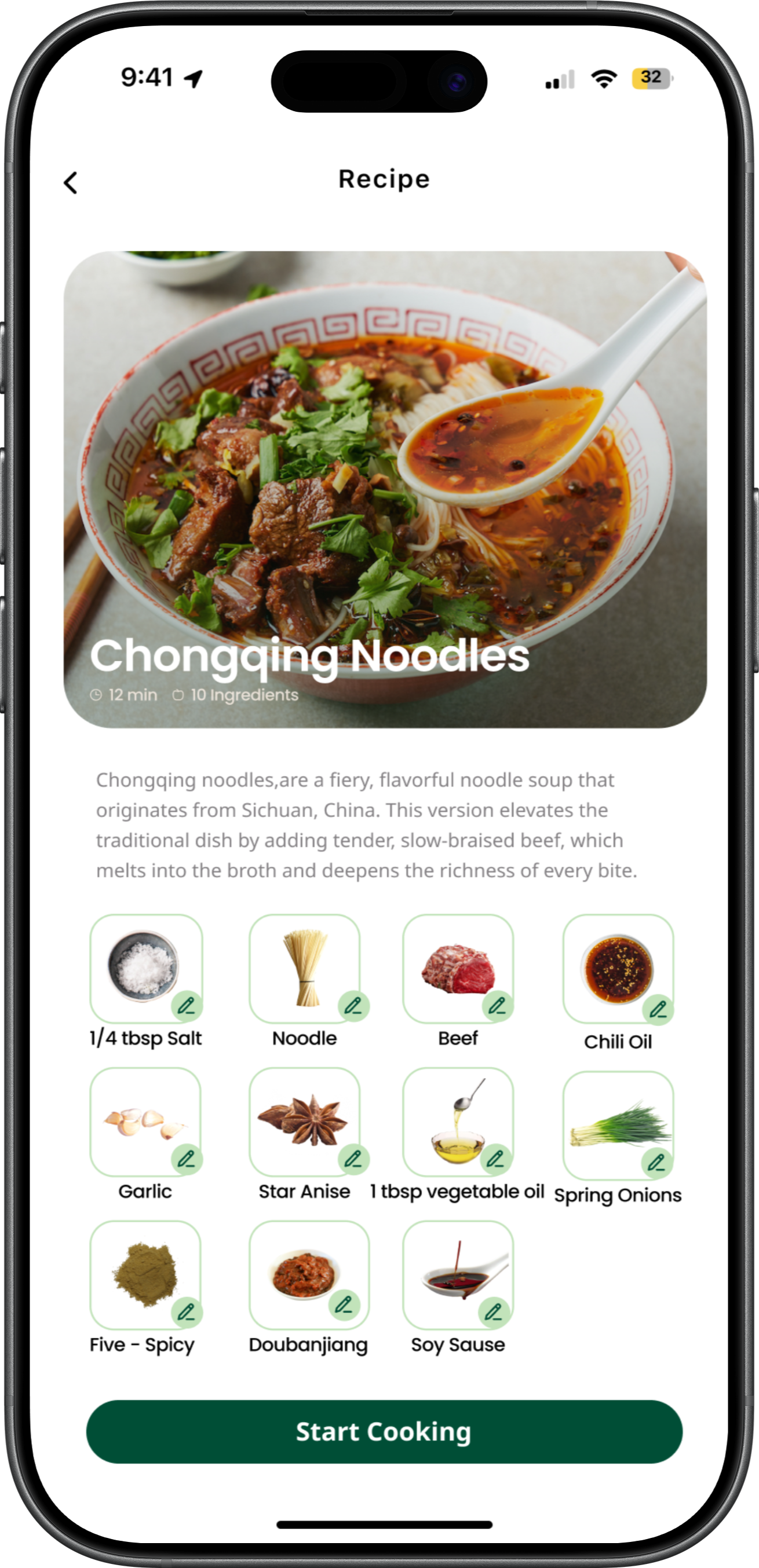
The stakeholder map helped position international students within a broader grocery ecosystem, highlighting how their needs differ from local users across planning, shopping, and cooking stages.
🤔
😬
📋
😬
🫤
🤔
😱
😕
🤔
🤔
😵💫
😵💫
In-store signs
Staff
Physical shelf
Package label
Product packaging
Price check
on phone
Self-checkout
Cashier
Rewards & coupons
Get lost
Time-consuming
Visual overload
Too many brands
Hard to choose
Long lines
High prices
Shelf locator
in app
“Beginner pick” tag
Shelf tag
Recipe-based
recommendations
Mobile payment
Automatic deals
Kitchen counter
Food packaging
YouTube
Measuring spoons
Stove
Smoke alarm
The ingredient itself
Recipe hints
Photo & share
Slow prep
Not familiar
with tools
Don’t understand
measure (tsp, tbsp)
Hard to
control heat
Can’t tell doneness
Poor presentation
Video tutorial
Visual ratio chart
Sauce packet
Real-time
reminders
Doneness
reference chart
Prompt users to share
😖
🤔
YouTube
TikTok
Whole Foods APP
Search engine
Recipe site
Recipe app
kitchen
Fridge
Memo
YouTube comments
Recipe app
Memo
Don’t know
where to start
Recipe is too complex
Miss ingredients
Easy to
miscalculate
Substitution fails
High risk
List doesn’t
match shelves
Beginner-friendly
recipes
3–5 ingredient
beginner recipes
One-click
shopping list
Compare
“have vs missing”
Suggest
substitute
ingredients
Smart shelf order
Want to cook a meal
What to cook
Confirm ingredients
what you’re
missing
Substitute
Create list
Suddenly want to cook
Search easy recipes
Check recipe ingredients
Compare kitchen vs recipe
Remove or replace
hard-to-find
ingredients
List missing
ingredients
I think I can do it
Which dish is easiest
What am I
missing
Only eggs and salt left at home
No need to
buy this maybe
Go to the store
navigate
Select
Compare ingredients
or brands
Purchase
Find listed
items in store
Scan the shelf
Compare
brands & prices
Checkout
Where is this
So many options
Which suits
me better
Hope this
is enough
Prepare
the ingredients
Seasonings
start cooking
Check if
it’s cooked
Done
Take out ingredients
Prep ingredients
Find and measure
seasonings
Heat pan
add oil, cook
Check the color
Taste it
Plate the dish
How to cut
How much is
one teaspoon
Is the pan too hot
Is it cooked
Finally done
😌
STAGE
ACTION
THINKING
EXPERIENCE
TOUCH
POINT
PAIN
POINT
OPPTUNITIES
Plan
Purchase
Cook
Beginner
STAGE
ACTION
THINKING
EXPERIENCE
TOUCH
POINT
PAIN
POINT
OPPTUNITIES
😵💫
🤷
😩
🧐
😨
😔
📋
📋
😰
🤔
😨
😰
In-store signs
Staff
Physical shelf
Package label
Price tag
Compare on
phone
Self-checkout
Cashier
Points
Supermarket
layout is complex
Visual overload
Unfamiliar brands
and high price
Can’t get
everything
in one trip
App shelf
navigation
International
ingredient tag
Recommend
items for
hometown dishes
Multi-channel
shopping
Kitchen counter
Cabinet
Stove
Ingredient
Table
Missing
traditional tools
Substitute
seasoning
Big flavor difference
Different
heat control
Hard to recreate
hometown flavors
Poor presentation
Video tutorial:
swap to
US kitchen tools
Flavor
similarity score
ooking assistant
gives alerts
Authentic swap
flavor balance tips
Simple plating
tips video
😟
😰
Family discussion
Cookbook
Recipe page
Kitchen
YouTube
comments
Family advice
Notes
APP list
Some ingredients
are uncommon
in the US
Recipe is
complex
Long
ingredient list
Need to shop
at multiple stores
Big flavor
difference
after substitution
Can’t get
everything
in one trip
Recommend
International
ingredients
section
Offer simplified hometown recipe
One-click list
with local
availability
Compare
what you have
what’s missing
Science-based
ingredient swaps
Cross-store
shopping list
Plan
Purchase
Cook
Want to
cook a meal
What to cook
Check the ingredients
what you’re
missing
Create list
Decide to cook
hometown dishes
this weekend.
Choose one
hometown dish
Check the
full list
Check the fridge
and cabinets
Remove
the hard-to-find
spices.
Write down
the missing
ingredients
Haven’t eaten
this dish
for a long time.
What ingredients
are needed
Many of
the seasonings
can’t be found
in the U.S.
Missing
seasonings
substitute
this spice
with something else
Go to
Whole Foods first,
then other
supermarket
Substitute
navigate
Select
Compare ingredients
or brands
Purchase
Enter
the supermarket
and look for
ingredients
Find the shelves
and start picking
Compare different
brands and prices.
Check out
and pay
Where is it
There are
so many types
Which one
should I take?
This organic
one is twice
as expensive as
the regular one.
I still have to
go to another
store to buy it.
Prepare
the ingredients
Seasonings
start cooking
Check if
it’s cooked
Done
Take out
the ingredients
and get ready
to cook
Take out
the spices
and sauces
Cook in the pan
Taste and observe
Serve to family
Will the texture
be worse
if I cut it
the wrong way?
This seasoning
tastes a bit
different.
Induction cooking
lacks the
wok flavor.
It still tastes
a bit off
Hope they like it
😌
immigrant
I mapped journeys for three user groups—international students, immigrants, and beginner cooks—to compare their experiences.
This helped identify both shared and unique pain points, and guided the decision to focus on international students as the primary target user.
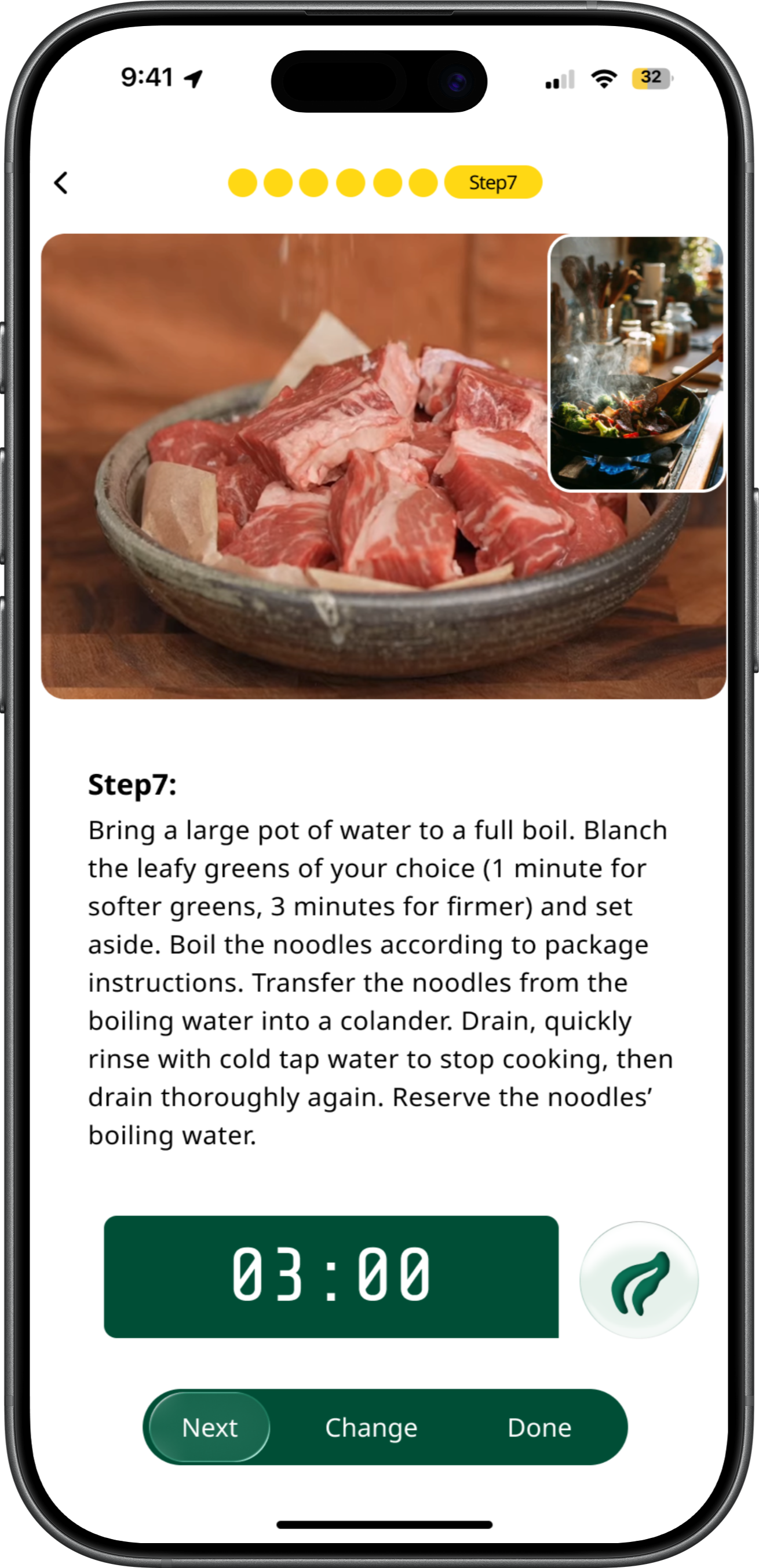
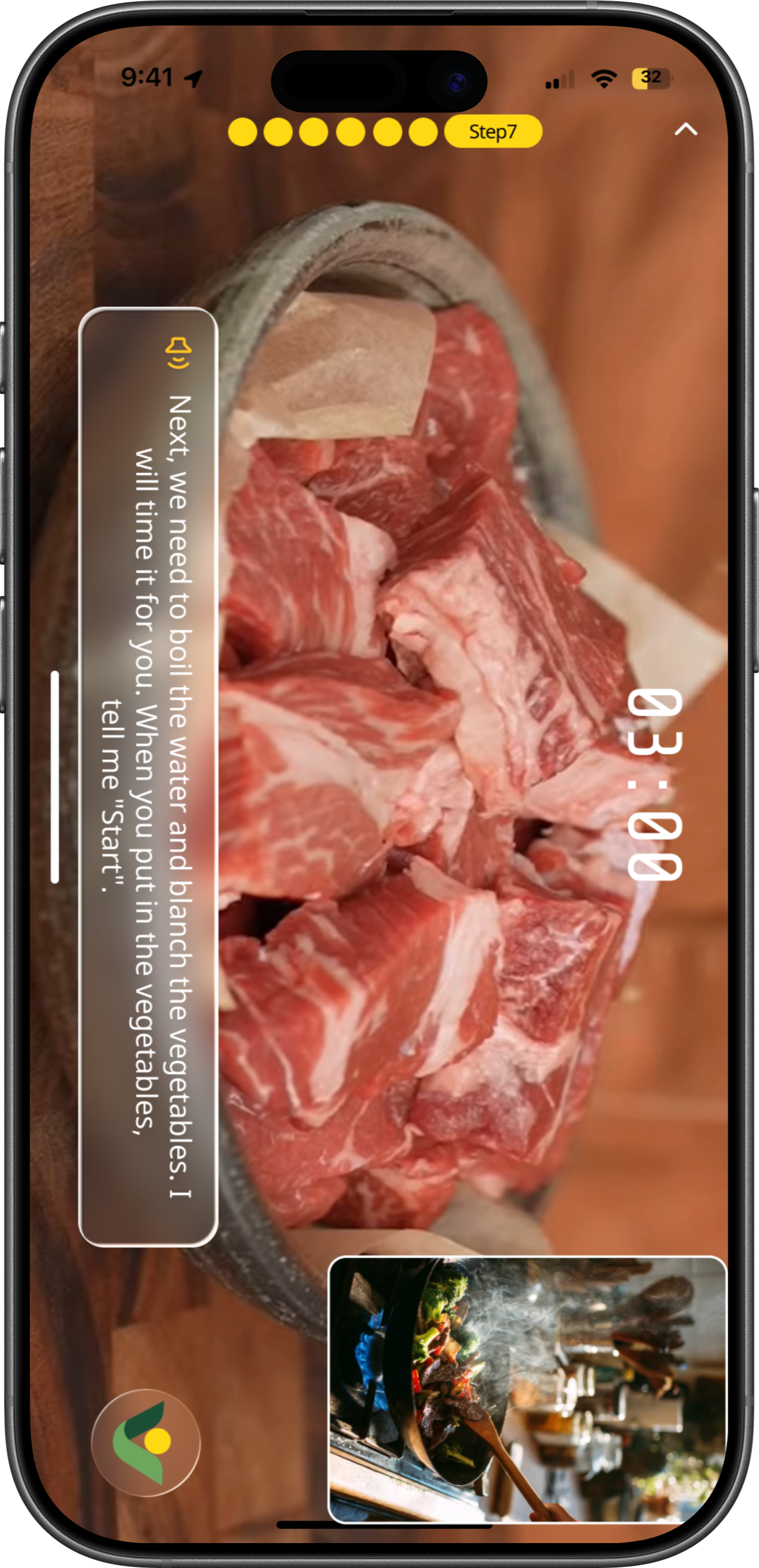
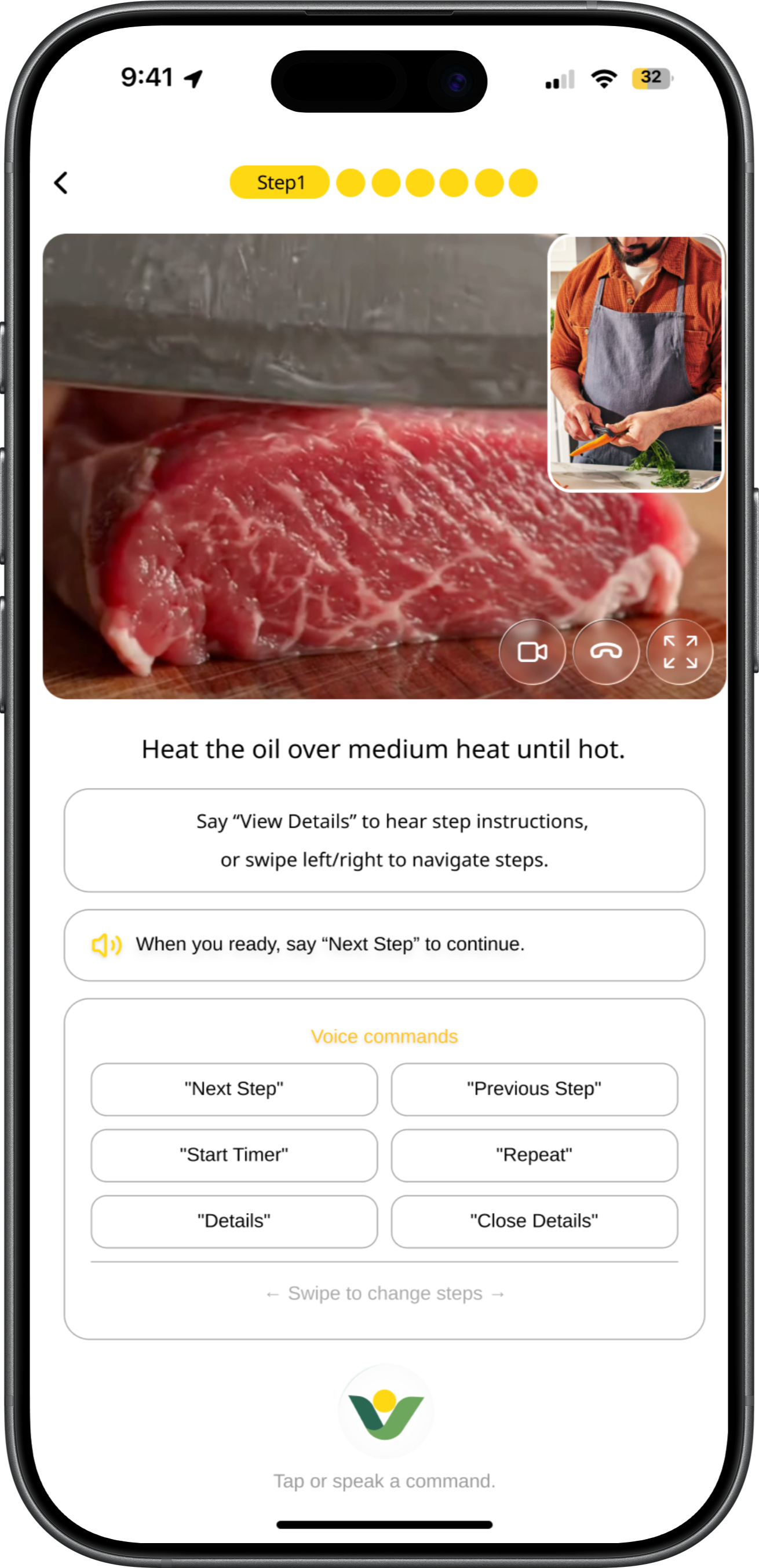
The two frames prioritize different user needs during cooking. Frame 1 focuses on efficient recipe execution by presenting more cooking information at once, while Frame 2 emphasizes onboarding and hands-free interaction guidance through stronger voice-command visibility. This comparison helped reveal the trade-off between instructional guidance and cooking efficiency in the design process.
Layout

Integrated cooking flow:
Combines ingredients, steps, timers, and actions in
one interface for a complete cooking experience

Strong timer visibility:
The cooking timer is clear and easy to track during
active use

High cognitive load:
Too much text increases reading and decision effort during cooking

Limited onboarding/guidance:
Users lack immediate instructions on how to interact with the system

Feels like a traditional recipe app:
Despite AI potential, the experience does not fully support a hands-free assistant behavior
Stepper
Tutorial video
Step-by-step tutorial in text form
Timer

CUI
Real-time
video

Strong voice interaction clarity:
Clear prompts and command buttons make hands-free control easy to understand and learn

High immersion:
Full-screen visuals and conversational AI create a
focused, engaging cooking experience

Natural hands-free interaction:
Voice prompts support intuitive, voice-led cooking flow

Aligned with AI assistant identity: Reinforces
Wholly as a conversational, voice-driven cooking
assistant

Good onboarding for beginners: Provides strong
step-by-step guidance and reduces learning barriers

Reduced content space:
Large command area takes up space from recipe
content

Visual imbalance:
Too many buttons and small images create a fragmented and scattered focus
Stepper
Tutorial video
Voice prompt words

CUI
Real-time
video
Timmer
Tutorial subtitle
Stepper
Stepper
Full screen Tutorial video
Ai support Tutorial subtitle
Real-time
video

CUI
Timmer
Missed
Ingredients
Hard to
Track Quantities
Auto-Generate
Missing Items List
Language
Barrier
App
Navigation
Lack of
Experience
Hands are
not free
Hands are
not free
Hands are
not free
Hands are
not free
Hands are
not free
Video
Tutorials
Cutting
Guide
Suggest
Local
Substitutes
Timing Tips
Multiple
Payment
Options
Simple
Plating Tips
Flavor
Differences
Heat
Control
Difficult
Tips for
Judging
Doneness
Bad Taste
Bilingual
Support
Hard to
Communicate
High Risk
Provide
Substitution
Options
Can’t
Understand
Differences
Budget constraints
Multiple Payment
Options
Payment
Guidance
Icon-based
Simple
Explanation
High Risk
Provide
Substitution
Options
Can’t
Locate
Items
Don’t Know
Shelf Layout
Auto-Sort by
Shelf Location
Mismatch and Confirm

Missing or Uncertain
Ingredient Amounts

Can’t Find
Ingredients
Need
Substitutes

Create list
Buy at
market


Don’t Know
Shelf Layout

Store Too Big

Unfamiliar Ingredients

Don’t Know
items

Brand
Differences

Cashier
vs. Self-checkout
Navigate
Compare
Budget

Don’t Know
How to
Wash or Chop

Don’t Know
Amount

Unfamiliar
Flavor

Oil Splashes

Different Taste

Hard to
Control Heat

Easily
Undercooked
or Overcooked
Season
Prep Ingredients
Cook
Check Doneness
Plate


Plan
Purchase
Cook
What to Cook

Cheaper and healther
than Takeout

Find Easy Recipes

Unfamiliar
Seasonings

Language
Barrier
No Cooking
Experience
Pain Point
Pain Point
Pain Point
Opportunities
Opportunities
Opportunities
Touch Point
Touch Point
Touch Point
Action
&
Thinking
Action
&
Thinking
Action
&
Thinking
Limited
Budget
Recipe
Budgeting
Simplified
Recipes
Ingredient Kits
Recipes
Complicated
Don’t Know
What to Buy
Language
Barrier
Bilingual
Support


Takes More
Time than
Takeout


How might we help users feel more confident throughout the entire cooking journey?
HOW MIGHT WE


What is Wholly
Wholly is an modern assistant for Whole Foods shoppers.
It helps you plan meals, make the most of your ingredients, and manage your shopping list effortlessly. In-store, Wholly suggests the fastest route to your items, compares products for the best value, and provides step-by-step cooking guidance so every meal is stress-free and delicious.
My Role
Lead Designer - Feature scoping, Research, Frame Design, System Design, Prototyping
Timeline
6 months, 2025.10-2026

Stakeholders Map
To break down these relationships and better understand their needs, I created a stakeholder map.


Amazon
electronic commerce operation
Farm
Recipe
Youtube Video
User-guided
Shop manager
Staff
Cashier
Dietary advice
Dietician
provide
provide
Gain
Receive
Scan
Feedback
Gather Data
Marketing
Search
Record
Push
Promote
technological
updates
Price
compare
Order
Cooperation
Authentication
Source

Share
Attract
Attract
Authentication
Compliance
Authentication
Provide
produce
collect
feedback
Environmental protection organization
Personalized recommendation
Market comparison data
Alternative identification tools
Sustainable certification
Consumer protection
governmental agencies
competitive brand
Food blogger
Online order
Pictures
Camera
Data analysis
Scanning results
Market maintenance






International Students






Search
Guide
Ask
Attract
Search
Teach













Order
Brief Introduction Relationship
Direct Relationship
The stakeholder map helped position international students within a broader grocery ecosystem, highlighting how their needs differ from local users across planning, shopping, and cooking stages.
After conducting initial contextual research into the cooking experiences of international students—including their planning, shopping, and cooking behaviors.
Core UX gap:
Although Whole Foods offers high-quality products, the experience is still fragmented:
In-store: overwhelming product variety and decision complexity
Not beginner- or international-user friendly: It assumes users are already familiar with local ingredients, brands, and cooking practices
Online: strong product catalog, but weak connection between ingredients and cooking
Core user behavior remains “buy ingredients,” not “complete a meal”
Limited real-time guidance: There is little support for in-the-moment decisions such as ingredient substitutions or cooking assistance
Lack of end-to-end support: The experience does not seamlessly connect meal planning → grocery shopping → cooking into a unified journey
Key Insight
This gap led me to further explore the different types of users involved in the grocery shopping and cooking experience.
Whole Foods Market is not designed as an international supermarket;
It is a U.S.-centric premium grocery system that offers limited global products but does not fully support international users in understanding, selecting, and using ingredients.

20–25%
International users and students
Problem
This question comes from the increasing complexity of everyday cooking.
Cooking is no longer just about preparing food — it involves planning meals, navigating grocery stores, understanding unfamiliar ingredients, and making decisions under constraints like budget, time, and language.
Context
Cooking at home has become an increasingly common part of everyday life.Recent studies show that many people now cook at home multiple times per week due to factors such as cost savings, healthier lifestyles, and changing daily routines.
As home cooking increased, grocery shopping became a larger part of everyday decision-making.To better understand these challenges, I focused my research on Whole foods market.


Sometimes
43%

Never
8%

Always
49%
Cooking Frequency Table
User Journey Map
After identifying international students as the primary user group, I conducted in-depth research into their cooking journey—from the moment they decide to prepare a meal, to navigating the supermarket, and finally cooking the dish.
By mapping this end-to-end experience, I identified key touch points and pain points at each stage, including planning, shopping, and cooking. This helped reveal systemic challenges such as unfamiliar ingredients, language barriers, decision fatigue, and lack of cooking confidence.
International Student
Users can take a photo of their ingredients with the camera, allowing Wholly to automatically recognize and identify each item. The system then generates an ingredient checklist, helping users quickly understand what they already have and what additional ingredients still need to be purchased.
After confirming the ingredient checklist, Wholly provides the locations of each ingredient in the store and suggests the most efficient shopping routes, while still allowing users to choose their preferred path. As users find and add ingredients, the shopping cart total updates in real time, helping them track spending and better manage their budget.
After users bring the ingredients home, Wholly provides recipe guidance while allowing users to freely substitute ingredients based on their preferences or available items. By turning on the camera, users can start a real-time cooking experience where Wholly observes the process and provides step-by-step guidance and support throughout cooking.
Final Design
Design system
Aa
SansSerif
Regular/Bold
Bb
Playfair Display
Bold Italic
Typography
Color
#004E36
#C2E3BA
#FFD814
#FAF5EC
CUI Design
Wholly is an AI assistant character inspired by the Whole Foods leaf. Its design uses clean lines and simple dots to create a smart, minimal look, blending a sense of nature with a modern, intelligent feel.
Definition

Smart
Reflects intelligence and the AI-driven nature, suggesting efficient and adaptive support.

Minimal
Uses simple lines and forms to create a clean, uncluttered visual style.

Natural
Inspired by the leaf element, connecting the design to organic growth and a sense of calm.

Real-time
Monitors and detects issues during cooking, offering immediate guidance and support.
Modality
Wholly Modality uses a leaf-inspired form combined with minimal lines to create a flexible and dynamic system.
The simple structure allows it to move and adapt smoothly, giving the AI assistant a sense of lightness, responsiveness, and life.

Motions
Wholly Motions adapt across different states, with both form and animation changing to reflect context. Each motion is designed to be clear and expressive, allowing the AI assistant to communicate status and feedback through subtle, fluid transformations.
Pain Point and Ideation
Insights from the user journey maps were synthesized into key pain points and translated into design opportunities, which guided the ideation process.
Problem
Ideation
Language barriers make labels, signs, and recipes hard to understand.
Help users follow cooking steps, reducing confusion from anxiety or inexperience.
Users struggle to find familiar seasonings and trust local alternatives.
Poor wayfinding makes it hard to find products efficiently.
Users struggle to choose recipes that match their skills, preferences, and constraints.
Selection
Budget
Visual step-by-step recipes
Personalized recipe suggestions
Budget-friendly options
Budget constraints limit ingredient choices.
Turn recipes into clear, visual step-by-step guides with tools and time.
Add multilingual support and visual cues to improve accessibility.
Recommend recipes based on user skill and available ingredients.
Suggest ingredient substitutes with flavor and pairing guidance.
Enable cost filters, price comparison, and smarter choices.
Provide in-app store navigation with aisle maps and product location tracking.
Step-by-step guidance keeps users focused with real-time reminders and assistance.
Hands-free navigation for recipes.


Recipes feel overwhelming—too complex, unclear on tools and ingredients, and too time-consuming.
Complexity
Language
Substitution
Wayfinding
Multilingual visual support
Confident substitutions
In-app map
Guidance
Enable hands-free access to recipes while cooking.

Hands busy
Real-time guidance
Hands-free navigation


Lower the Barrier for
International students
Smart Ingredient Management
Smarter
Shopping Support
Cross-Language & Easy Access
1
2
3
4
Provide personalized, accessible, and hands-free cooking support, including skill and ingredient-based recipe recommendations, cost-aware guidance, visual step-by-step instructions, ingredient substitutions with flavor tips, multilingual support, and in-app store navigation to reduce confusion and improve efficiency.
Wholly is placed within the ordering flow rather than the homepage to ensure it appears at the most relevant moment—when users are actively making meal and grocery decisions—making the assistance more contextual and actionable.
Design
Wholly is designed as a contextual assistant rather than a homepage feature, embedded into the ordering flow where decision-making happens.
Homepage Placement
Ordering Flow Placement
9:41


32


Search recipes in Whole Foods Market


Fastest
Easiest
Most Popular
Budget-friendly
Popular collections
Whatever Makes You Whole.

ORDER
9:41
32
New
Market Recipes
Cook Now
Every meal becomes a simple, creative expression.
Interactive Design
This interactive design allows users to use their camera to recognize ingredients in real time. As the camera scans, the detected ingredients are automatically generated into an ingredient list, helping users quickly organize what they have available. During the recognition process, animated flashing dots create visual feedback to show that the system is actively scanning and analyzing the ingredients, making the interaction feel more responsive, intuitive, and alive.
The stakeholder map helped position international students within a broader grocery ecosystem, highlighting how their needs differ from local users across planning, shopping, and cooking stages.
🤔
📋
😬
🫤
🤔
😱
😕
🤔
🤔
😵💫
😵💫
In-store signs
Staff
Physical shelf
Package label
Product packaging
Price check
on phone
Self-checkout
Cashier
Rewards & coupons
Get lost
Time-consuming
Visual overload
Too many brands
Hard to choose
Long lines
High prices
Shelf locator
in app
“Beginner pick” tag
Shelf tag
Recipe-based
recommendations
Mobile payment
Automatic deals
Kitchen counter
Food packaging
YouTube
Measuring spoons
Stove
Smoke alarm
The ingredient itself
Recipe hints
Photo & share
Slow prep
Not familiar
with tools
Don’t understand
measure (tsp, tbsp)
Hard to
control heat
Can’t tell doneness
Poor presentation
Video tutorial
Visual ratio chart
Sauce packet
Real-time
reminders
Doneness
reference chart
Prompt users to share
😖
🤔
YouTube
TikTok
Whole Foods APP
Search engine
Recipe site
Recipe app
kitchen
Fridge
Memo
YouTube comments
Recipe app
Memo
Don’t know
where to start
Recipe is too complex
Miss ingredients
Easy to
miscalculate
Substitution fails
High risk
List doesn’t
match shelves
Beginner-friendly
recipes
3–5 ingredient
beginner recipes
One-click
shopping list
Compare
“have vs missing”
Suggest
substitute
ingredients
Smart shelf order
Want to cook a meal
What to cook
Confirm ingredients
what you’re
missing
Substitute
Create list
Suddenly want to cook
Search easy recipes
Check recipe ingredients
Compare kitchen vs recipe
Remove or replace
hard-to-find
ingredients
List missing
ingredients
I think I can do it
Which dish is easiest
What am I
missing
Only eggs and salt left at home
No need to
buy this maybe
Go to the store
navigate
Select
Compare ingredients
or brands
Purchase
Find listed
items in store
Scan the shelf
Compare
brands & prices
Checkout
Where is this
So many options
Which suits
me better
Hope this
is enough
Prepare
the ingredients
Seasonings
start cooking
Check if
it’s cooked
Done
Take out ingredients
Prep ingredients
Find and measure
seasonings
Heat pan
add oil, cook
Check the color
Taste it
Plate the dish
How to cut
How much is
one teaspoon
Is the pan too hot
Is it cooked
Finally done
😌
STAGE
ACTION
THINKING
EXPERIENCE
TOUCH
POINT
PAIN
POINT
OPPTUNITIES
Plan
Purchase
Cook
Beginner
STAGE
ACTION
THINKING
EXPERIENCE
TOUCH
POINT
PAIN
POINT
OPPTUNITIES
😵💫
🤷
😩
🧐
😨
😔
📋
📋
😰
🤔
😨
😰
In-store signs
Staff
Physical shelf
Package label
Price tag
Compare on
phone
Self-checkout
Cashier
Points
Supermarket
layout is complex
Visual overload
Unfamiliar brands
and high price
Can’t get
everything
in one trip
App shelf
navigation
International
ingredient tag
Recommend
items for
hometown dishes
Multi-channel
shopping
Kitchen counter
Cabinet
Stove
Ingredient
Table
Missing
traditional tools
Substitute
seasoning
Big flavor difference
Different
heat control
Hard to recreate
hometown flavors
Poor presentation
Video tutorial:
swap to
US kitchen tools
Flavor
similarity score
ooking assistant
gives alerts
Authentic swap
flavor balance tips
Simple plating
tips video
😟
😰
Family discussion
Cookbook
Recipe page
Kitchen
YouTube
comments
Family advice
Notes
APP list
Some ingredients
are uncommon
in the US
Recipe is
complex
Long
ingredient list
Need to shop
at multiple stores
Big flavor
difference
after substitution
Can’t get
everything
in one trip
Recommend
International
ingredients
section
Offer simplified hometown recipe
One-click list
with local
availability
Compare
what you have
what’s missing
Science-based
ingredient swaps
Cross-store
shopping list
Plan
Purchase
Cook
Want to
cook a meal
What to cook
Check the ingredients
what you’re
missing
Create list
Decide to cook
hometown dishes
this weekend.
Choose one
hometown dish
Check the
full list
Check the fridge
and cabinets
Remove
the hard-to-find
spices.
Write down
the missing
ingredients
Haven’t eaten
this dish
for a long time.
What ingredients
are needed
Many of
the seasonings
can’t be found
in the U.S.
Missing
seasonings
substitute
this spice
with something else
Go to
Whole Foods first,
then other
supermarket
Substitute
navigate
Select
Compare ingredients
or brands
Purchase
Enter
the supermarket
and look for
ingredients
Find the shelves
and start picking
Compare different
brands and prices.
Check out
and pay
Where is it
There are
so many types
Which one
should I take?
This organic
one is twice
as expensive as
the regular one.
I still have to
go to another
store to buy it.
Prepare
the ingredients
Seasonings
start cooking
Check if
it’s cooked
Done
Take out
the ingredients
and get ready
to cook
Take out
the spices
and sauces
Cook in the pan
Taste and observe
Serve to family
Will the texture
be worse
if I cut it
the wrong way?
This seasoning
tastes a bit
different.
Induction cooking
lacks the
wok flavor.
It still tastes
a bit off
Hope they like it
😌
immigrant
I mapped journeys for three user groups—international students, immigrants, and beginner cooks—to compare their experiences.
This helped identify both shared and unique pain points, and guided the decision to focus on international students as the primary target user.
The two frames prioritize different user needs during cooking. Frame 1 focuses on efficient recipe execution by presenting more cooking information at once, while Frame 2 emphasizes onboarding and hands-free interaction guidance through stronger voice-command visibility. This comparison helped reveal the trade-off between instructional guidance and cooking efficiency in the design process.
Layout

Integrated cooking flow:
Combines ingredients, steps, timers, and actions in
one interface for a complete cooking experience

Strong timer visibility:
The cooking timer is clear and easy to track during
active use

High cognitive load:
Too much text increases reading and decision effort during cooking

Limited onboarding/guidance:
Users lack immediate instructions on how to interact with the system

Feels like a traditional recipe app:
Despite AI potential, the experience does not fully support a hands-free assistant behavior

Strong voice interaction clarity:
Clear prompts and command buttons make hands-free control easy to understand and learn

High immersion:
Full-screen visuals and conversational AI create a
focused, engaging cooking experience

Natural hands-free interaction:
Voice prompts support intuitive, voice-led cooking flow

Aligned with AI assistant identity: Reinforces
Wholly as a conversational, voice-driven cooking
assistant

Good onboarding for beginners: Provides strong
step-by-step guidance and reduces learning barriers

Reduced content space:
Large command area takes up space from recipe
content

Visual imbalance:
Too many buttons and small images create a fragmented and scattered focus

CUI
Missed
Ingredients
Hard to
Track Quantities
Auto-Generate
Missing Items List
Language
Barrier
App
Navigation
Lack of
Experience
Hands are
not free
Hands are
not free
Hands are
not free
Hands are
not free
Hands are
not free
Video
Tutorials
Cutting
Guide
Suggest
Local
Substitutes
Timing Tips
Multiple
Payment
Options
Simple
Plating Tips
Flavor
Differences
Heat
Control
Difficult
Tips for
Judging
Doneness
Bad Taste
Bilingual
Support
Hard to
Communicate
High Risk
Provide
Substitution
Options
Can’t
Understand
Differences
Budget constraints
Multiple Payment
Options
Payment
Guidance
Icon-based
Simple
Explanation
High Risk
Provide
Substitution
Options
Can’t
Locate
Items
Don’t Know
Shelf Layout
Auto-Sort by
Shelf Location
Mismatch and Confirm

Missing or Uncertain
Ingredient Amounts

Can’t Find
Ingredients
Need
Substitutes

Create list
Buy at
market


Don’t Know
Shelf Layout

Store Too Big

Unfamiliar Ingredients

Don’t Know
items

Brand
Differences

Cashier
vs. Self-checkout
Navigate
Compare
Budget

Don’t Know
How to
Wash or Chop

Don’t Know
Amount

Unfamiliar
Flavor

Oil Splashes

Different Taste

Hard to
Control Heat

Easily
Undercooked
or Overcooked
Season
Prep Ingredients
Cook
Check Doneness
Plate


Plan
Purchase
Cook
What to Cook

Cheaper and healther
than Takeout

Find Easy Recipes

Unfamiliar
Seasonings

Language
Barrier
No Cooking
Experience
Pain Point
Pain Point
Pain Point
Opportunities
Opportunities
Opportunities
Touch Point
Touch Point
Touch Point
Action
&
Thinking
Action
&
Thinking
Action
&
Thinking
Limited
Budget
Recipe
Budgeting
Simplified
Recipes
Ingredient Kits
Recipes
Complicated
Don’t Know
What to Buy
Language
Barrier
Bilingual
Support


Takes More
Time than
Takeout


How might we help users feel more confident throughout the entire cooking journey?
HOW MIGHT WE


Created by ©Yaxuan Cai 2026